
Promote Products & Special Offers

Product promotions and limited-time offers are powerful ways to increase engagement, boost conversions, and encourage visitors to complete a purchase. With Tango.ad, you can create targeted campaigns that showcase discounts, new arrivals, seasonal promotions, or featured products at the right moment in the customer journey.
This guide explains how to create and optimize a campaign for promoting products and special offers.
For an overview of campaign creation, see Campaigns Overview.
Why Promote Products & Special Offers?
Promotional campaigns can help you:
- Increase product visibility.
- Drive more sales during promotions.
- Highlight new arrivals or best-selling products.
- Encourage customers to act before an offer expires.
- Improve conversion rates with timely messaging.
For additional strategies to improve campaign performance, see Increase Conversion Rates.
Before You Begin
Make sure you have:
- A published website with the Tango.ad tracking script installed.
- A product, promotion, or offer you want to promote.
- Product images or promotional graphics, if needed.
- A clear call-to-action, such as:
- Shop Now
- View Collection
- Claim Discount
- Learn More
If your promotion includes a discount code, see Coupons Overview.
Step 1: Create a New Campaign
- Click Create Campaign.
- Choose a suitable campaign type or start with a blank campaign.
- Enter a descriptive campaign name.
For more information about creating campaigns manually, see Create a Campaign Manually.
You can also use Create a Campaign with AI to generate an initial campaign based on your promotion.

Step 2: Design Your Promotion
Use the Design Editor Overview to build and customize your promotional campaign.
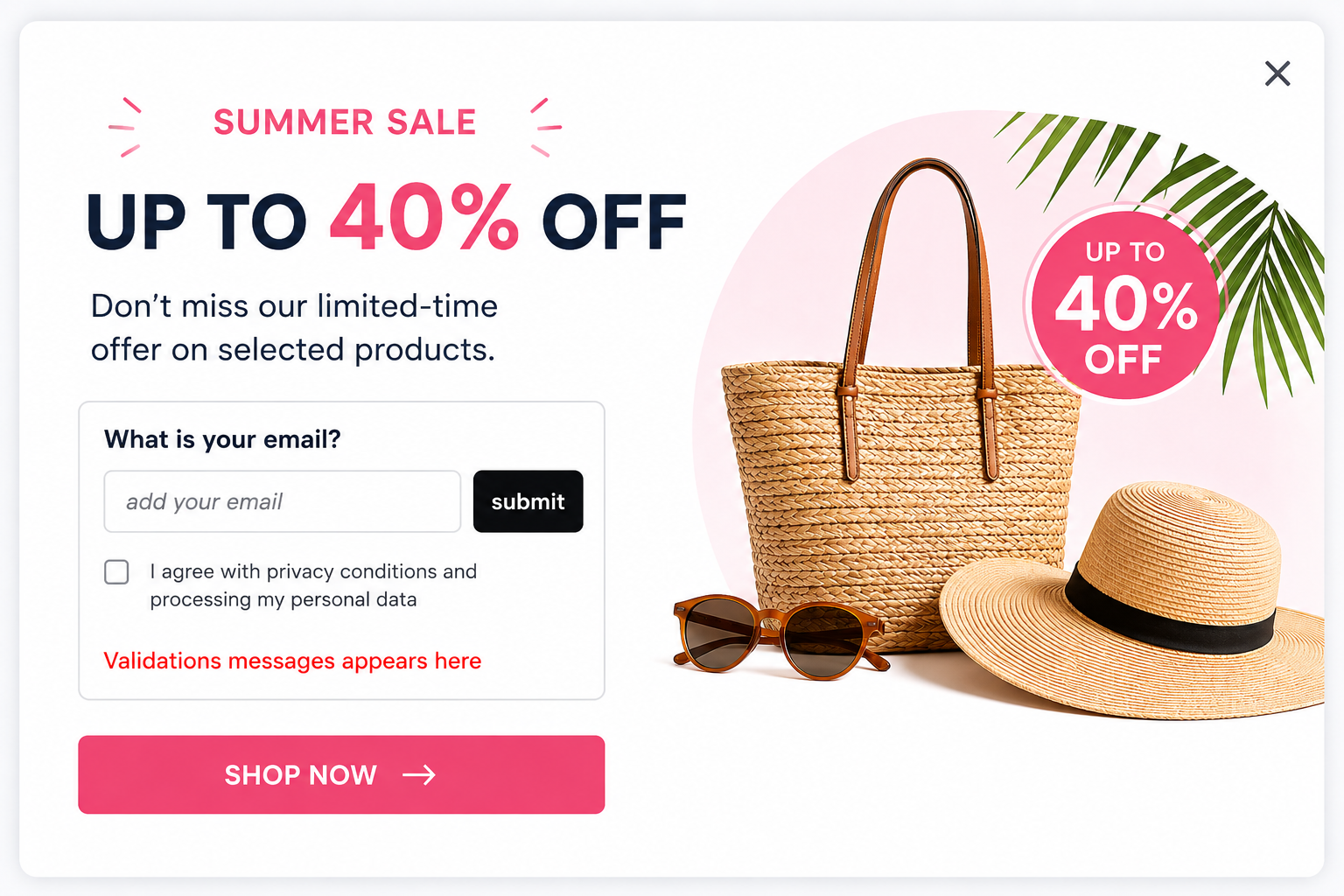
A typical promotional popup includes:
- Headline
- Product image or promotional banner
- Short description
- Discount or offer details
- Call-to-action button
- Close button
Example headline:
Summer Sale – Up to 40% Off
Example description:
Don't miss our limited-time offer on selected products.
Use Working with Components to add text, images, buttons, and other campaign elements.
Step 3: Highlight Your Offer
Make your promotion easy to understand at a glance.

Keep the main offer prominent and use concise messaging to communicate the value quickly.
Use Layout & Styling to adjust colors, typography, spacing, backgrounds, and other visual elements.
If you're using a discount code, you can manage it with Create Coupon Pools and Assign Coupons.
Step 4: Configure Display Rules
Choose when visitors should see your promotion.
Use the Workflow Editor Overview to configure the campaign behavior.
Common triggers include:
- After a few seconds on the page.
- After scrolling a certain percentage.
- Exit intent.
- When visiting specific pages.
- After viewing multiple pages.
- During a selected promotional period.
Use Triggers to determine when the workflow starts.

Step 5: Target the Right Visitors
Use workflow conditions to show promotions to visitors who are most likely to be interested.

Use Conditions and Actions to configure targeting rules.
For more advanced customer journeys, see Building Workflows.
Step 6: Add a Strong Call-to-Action
Your CTA should clearly tell visitors what to do next.

Keep the CTA short, action-oriented, and aligned with your promotional goal.
You can customize buttons and other interactive elements using Working with Components.
Step 7: Preview and Publish
Before publishing your campaign:
- Review the design and promotional details.
- Verify all links and buttons.
- Check your workflow and targeting rules.
- Preview the campaign on supported devices.
- Save your changes.
- Publish or activate the campaign.
Use Campaign Settings to review your campaign configuration before publishing.

Best Practices
To maximize campaign performance:
- Use high-quality product images.
- Keep promotional text concise.
- Make the discount or offer highly visible.
- Include a clear call-to-action.
- Create urgency with limited-time messaging when appropriate.
- Schedule campaigns to match your promotion dates.
- Target visitors based on relevant behavior and attributes.
- Test different designs, headlines, and offers to improve results.
For more information about optimizing campaigns, see Increase Conversion Rates.
Monitor Performance
After publishing, use Analytics Overview to monitor your campaign performance.
Depending on your campaign, you can review metrics such as:
| Metric | Description |
|---|---|
| Reach | Number of visitors who viewed the promotion. |
| Conversions | Number of visitors who completed the desired action. |
| Conversion Rate | Percentage of visitors who converted after seeing the campaign. |
| Clicks | Number of visitors who clicked the call-to-action. |
| Revenue Uplift | Difference in average revenue per visitor between campaign-exposed visitors and the control group. |
For a more detailed view of revenue impact, see Analytics: Revenue Uplift.

Tips for Better Promotional Campaigns
- Focus on one primary offer per campaign.
- Use compelling visuals to attract attention.
- Display promotions to visitors most likely to convert.
- Avoid overwhelming visitors with multiple promotional campaigns.
- Refresh campaigns regularly to keep content relevant.
- Use AI Design to quickly test different creative concepts.
- Review analytics regularly and optimize underperforming campaigns.
See AI Design to learn how to generate campaign designs with AI.
Related Articles
- Campaigns Overview
- Create a Campaign with AI
- Create a Campaign Manually
- Design Editor Overview
- Working with Components
- Layout & Styling
- AI Design
- Workflow Editor Overview
- Triggers
- Conditions and Actions
- Building Workflows
- Analytics Overview
- Analytics: Revenue Uplift
- Coupons Overview
- Create Coupon Pools
- Assign Coupons
- Increase Conversion Rates